Product Update — May 2026: From Insight to Action
A wrap-up of the last four weeks of DigiUsher releases. refreshed one-click remediation using Azure DevOps, new deep cost-saving scenarios across AWS, GCP and Google Workspace, full commitment utilization tracking across all cloud providers, smarter enhanced forecasting, and a refreshed navigation built so every FinOps role finds what they need faster.
From insight to action — smarter savings, sharper visibility, fewer clicks.
The last four weeks of DigiUsher releases have a single throughline: shrink the distance between seeing a problem and fixing it. We expanded the catalogue of money-saving saving scenarios across cloud and SaaS, added a one-click way to act on them, gave commitments their own end-to-end visibility, and rebuilt navigation so every persona — finance, FinOps, platform, executive — lands on what matters first.
One-click remediation lands through workflow automations using Azure DevOps in Saving Scenarios
Every saving scenario in DigiUsher now ships with an in-product Remediate button powered by your existing Azure DevOps. Once your administrator turns on automation, FinOps analysts can apply the savings through your organization’s change management processes, without chasing the resource owner. The same saving scenario also gets its own shareable detail page, so passing context to the team that owns the workload is now a copy-paste of a link rather than a long Slack thread. Less manual work, less back-and-forth, savings captured the day they’re identified.
More services, more savings — across cloud and SaaS
We added new saving scenarios for AWS Bedrock, Google Cloud SQL, Google Cloud Spanner, and Google Compute Engine rightsizing and machine-family upgrades. On the SaaS side, DigiUsher now spots suspended Google Workspace accounts that are still consuming a paid license and recommends reclaiming them. Each new scenario shows up directly inside the same recommendations stream FinOps teams already work, with concrete savings estimates and an owner ready to action it. The result: a meaningfully bigger pool of identified savings — across AI inference spend and SaaS licenses — every week, FOCUS-formatted by default, without rolling out a new tool.
Google Workspace is now a first-class data source
Connecting Google Workspace takes minutes, not a project. Costs and inventory flow in alongside cloud spend, with historical backfill on first connect, normalised into FOCUS format, so chargeback and budget views start with real history instead of a blank slate. Finance managers get a single place to see infrastructure, AI platforms, and productivity SaaS, and chargeback that reflects the full picture rather than just the cloud bill.
Chargeback gets recalculate-on-demand, dimension filters, and breakdowns
When allocation rules change mid-month, you no longer wait for the next cycle to see corrected numbers — the new Recalculate button refreshes chargeback views on demand (with a sensible cooldown so the system stays healthy). New dimension filters and breakdowns let you slice allocations by any combination of business attributes, and Sankey, filter and dropdown glitches that nagged power users are now fixed. Finance closes faster, with numbers everyone trusts.
Unit Economics V2: cost-per-anything, without engineering
The new unit economics engine is fully formula-based. FinOps teams define the metrics that matter — cost per transaction, cost per active user, cost per model invocation — by writing a formula and picking the dimensions, all from a dedicated configuration screen. No code, no help-desk tickets, no waiting on a sprint. Executives get the business-aligned KPIs they’ve been asking for, and FinOps owns the definitions instead of inheriting them.
Forecasting moves to the server and gets more accurate
We replaced in-browser forecasting with a dedicated server-side engine — and shipped accuracy improvements at the same time. Forecasts now run consistently no matter the size of your data, refresh faster on dashboards, and tie back to a single source of truth. CFOs and finance leaders make next-quarter calls on numbers that match what the platform actually predicts.
Kubernetes rightsizing arrives as a first-class tab
A new Rightsizing experience inside Kubernetes shows pod-, workload-, and namespace-level recommendations alongside cluster costs. Platform engineers and FinOps practitioners can now find Kubernetes waste in the same flow they use for the rest of the estate. Lower cluster bills without spinning up a separate cost tool for containers — at any node count.
A navigation that gets out of your way
The sidebar has been rebuilt as an accordion, with dedicated landing pages for Radar, Forecasting, and Custom Dashboards — and the items you pin stay pinned. Every dashboard widget now carries an Explore action that drops you straight into the right Cost Explorer view, ready to investigate. New out-of-the-box dashboards for AWS and Azure mean every account has an executive overview on day one. Less hunting, fewer clicks, faster decisions for every role.
Onboarding, data sources, and partner branding
First-time users now see a real, guided gate where they once met an opaque mock screen — so the path from sign-up to first connected cloud is shorter. Kubernetes data sources expose their API key with a clear reveal toggle, and sensitive Azure and OCI credentials are no longer surfaced in detail views by default. A cleaner first impression, tighter handling of credentials, and a partner-ready product for the channel.
What this all moves the needle on
Taken together, last month compresses the FinOps loop. There are more savings to find — across AI, SaaS, and traditional cloud — and a one-click way to capture them. There’s a single trustworthy view of every commitment, cleaner tags, recalculable chargeback, and unit-economics KPIs your CFO actually asked for. And the whole thing is easier to navigate, whether you’re a finance manager closing the month, a cloud architect renewing a Savings Plan, or an executive checking forecast versus budget. See clearly. Decide quickly. Act in one click.
Frequently Asked Questions
What did DigiUsher release in May 2026?
DigiUsher’s May 2026 product update delivered eight capability areas across the FinOps Operating System platform, all oriented around a single design principle: reducing the distance between identifying a cost problem and resolving it. The release introduced one-click remediation through Azure DevOps workflow automation, so FinOps analysts can apply approved savings scenarios directly inside their organisation’s existing change-management processes without manual ticket creation or resource-owner chasing. New saving scenarios were added for AWS Bedrock, Google Cloud SQL, Google Cloud Spanner, and Google Compute Engine rightsizing — expanding DigiUsher’s AI inference cost governance to cover Bedrock natively alongside Azure OpenAI, Google Vertex AI, and Databricks. On the SaaS governance side, the platform now detects suspended Google Workspace accounts still consuming paid licences and surfaces them as actionable recommendations in the same FinOps workflow. Unit Economics V2 shipped with a fully formula-based engine that lets FinOps teams define cost-per-transaction, cost-per-active-user, or cost-per-model-invocation metrics from a configuration screen — no code, no engineering dependency. Kubernetes rightsizing arrived as a first-class experience, presenting pod-, workload-, and namespace-level recommendations alongside cluster costs with no node-count limit. Chargeback was upgraded with recalculate-on-demand, new dimension filters, and Sankey-view improvements. Server-side forecasting replaced in-browser computation, delivering consistent accuracy at enterprise data scale. Navigation was rebuilt as an accordion sidebar with dedicated landing pages for Radar, Forecasting, and Custom Dashboards. Every capability added in this release operates on FOCUS 1.x–formatted data by default.
What is one-click remediation in a FinOps platform, and how does DigiUsher implement it?
One-click remediation in a FinOps platform is the capability to apply an identified cost-saving recommendation directly from within the FinOps tool — without leaving the platform, without creating a manual ticket, and without chasing the resource owner through a separate communication channel. In the majority of FinOps deployments, identified savings go uncaptured because the path from recommendation to action requires a FinOps analyst to summarise the finding, route it to the owning team, wait for approval, and then verify the change — a cycle that can take days or weeks per scenario. DigiUsher’s May 2026 release closes this loop by embedding a Remediate button directly inside every saving scenario. When an administrator activates workflow automation, pressing that button opens a governed action through the organisation’s existing Azure DevOps pipeline — respecting the same change-management approvals and audit trails already in place, rather than bypassing them. Each saving scenario simultaneously generates a shareable detail page with a stable URL, so passing context to the workload owner is a link copy rather than a Slack thread. The result is end-to-end automation that is fully governed, compliant with existing change-management processes, and native to the tooling the platform engineering and operations teams already use. This model treats savings capture as an operational workflow — not a manual, analyst-driven reporting exercise.
How does DigiUsher integrate with Azure DevOps for FinOps automation?
DigiUsher’s Azure DevOps integration connects the FinOps remediation layer directly to an organisation’s existing DevOps pipeline, enabling cost-saving recommendations to be acted on through governed change-management processes rather than through ad hoc, manual interventions. The integration is administrator-configured: once an organisation’s Azure DevOps workspace is connected, every saving scenario in DigiUsher gains a Remediate action that triggers an Azure DevOps pipeline run. This means the change request follows the same approval workflow, the same security reviews, and the same rollback procedures the engineering organisation already uses for infrastructure modifications — there is no separate approval path for FinOps actions, and no shadow-IT risk from cost changes being made outside governed processes. DigiUsher passes the full context of the saving scenario — resource identifier, recommended action, projected saving, and owning team — to the DevOps pipeline as structured data, eliminating the information-loss problem that occurs when FinOps findings are summarised in natural language before routing. The integration is also audit-ready: every remediation action is traceable from the DigiUsher saving scenario to the corresponding Azure DevOps run, giving finance and compliance teams a complete record of what was changed, why, and by whom. This approach extends DigiUsher’s FOCUS-native architecture into the action layer — cost governance that is structured, attributable, and operationally consistent with how the rest of the technology estate is managed.
What is Unit Economics V2 in DigiUsher, and why does it matter for enterprise FinOps?
Unit Economics V2 in DigiUsher is a fully formula-based cost attribution engine that enables FinOps teams to define, configure, and own business-aligned cost metrics — such as cost per transaction, cost per active user, cost per API call, or cost per model invocation — entirely from a self-service configuration screen, with no engineering involvement, no code changes, and no dependency on a sprint cycle. The shift matters because the central failure mode in enterprise FinOps is not the absence of cloud cost data — it is the inability to connect that data to the business metrics that CFOs and board-level stakeholders actually use to measure value. When cost-per-unit metrics must be engineered into a data pipeline by the platform team, they take weeks to define, are brittle when business definitions change, and are owned by engineers rather than the FinOps function. Unit Economics V2 inverts this: FinOps practitioners write a formula — for example, total Bedrock inference cost divided by daily active users — select the relevant cost dimensions, and the platform computes the metric continuously across the full data history. The CFO receives a KPI they asked for. The Head of FinOps owns the definition and can update it when the business logic changes. No tickets, no sprint backlog, no weeks of latency. For enterprises governing AI workloads, cost-per-model-invocation and cost-per-agent-chain metrics built natively in Unit Economics V2 give the finance function the first real visibility into AI unit economics without requiring custom engineering work from the team building the AI platform itself.
How does DigiUsher handle Kubernetes cost rightsizing?
DigiUsher’s Kubernetes rightsizing capability — released as a first-class tab in May 2026 — surfaces pod-level, workload-level, and namespace-level cost reduction recommendations inside the same FinOps workflow the team uses for the rest of the technology estate, with no separate tool required and no node-count limit. The problem Kubernetes rightsizing solves is specific: container infrastructure creates a layer of cost abstraction that sits between the cloud billing line item and the application or business unit that generated it. Without rightsizing at the workload level, platform teams and FinOps practitioners can see cluster-level costs but cannot attribute waste to the specific deployments, namespaces, or resource requests that are responsible for it. DigiUsher’s approach ingests Kubernetes metrics — pod resource requests versus actual utilisation, workload-level bin-packing efficiency, namespace-level cost attribution — and generates concrete rightsizing recommendations with projected savings. These recommendations appear in the same Saving Scenarios stream as cloud infrastructure and SaaS findings, meaning a FinOps analyst sees Kubernetes waste, AWS Bedrock over-provisioning, and a suspended Google Workspace licence in a single unified view. For platform engineers, rightsizing data is surfaced at the granularity they work at: individual workload and namespace-level, not rolled up to a cluster summary that obscures where action is needed. The integration with DigiUsher’s FOCUS-native data model means Kubernetes costs are attributed using the same cost allocation dimensions as the rest of the estate — no separate taxonomy for containers.
What is FOCUS-native chargeback, and how does DigiUsher implement recalculate-on-demand?
FOCUS-native chargeback is a cost allocation model in which every chargeback calculation is performed against cost data that conforms to the FinOps Open Cost and Usage Specification (FOCUS 1.x), ensuring that costs from AWS, Azure, GCP, OCI, Kubernetes, AI platforms, and SaaS are attributed to business units using a single, consistent cost schema — not a patchwork of provider-specific billing formats that require manual normalisation. The practical consequence is that allocation rules written in DigiUsher work identically across all data sources: a rule that allocates costs by business unit tag applies to Azure infrastructure costs, AWS Bedrock inference costs, and Google Workspace licence costs using the same logic, because all three arrive in FOCUS format. DigiUsher’s May 2026 chargeback update added three capabilities to this foundation. Recalculate-on-demand allows finance managers to trigger a fresh chargeback run at any point in the month — with a built-in cooldown to preserve system performance — so when allocation rules change mid-cycle, corrected numbers are visible immediately rather than at the next monthly refresh. New dimension filters and breakdowns allow chargeback views to be sliced by any combination of business attributes, including custom hierarchies defined by the organisation. The Sankey-view improvements give finance teams a visual flow map of how costs traverse from cloud providers through shared services to business units, making allocation logic auditable and explainable to stakeholders who did not configure it. Together, these changes allow finance to close the month faster, with numbers that are traceable, recalculate-able, and trusted by the business units being charged.
How does DigiUsher govern AI inference costs — including AWS Bedrock — natively?
DigiUsher governs AI inference costs — including AWS Bedrock, Azure OpenAI, Google Vertex AI, Databricks, and Snowflake ML — natively within the same FinOps Operating System that governs cloud infrastructure, Kubernetes, and SaaS, rather than as a retrofitted module added to a tool built for virtual machine cost management. Native AI governance in DigiUsher means three things in practice. First, AI inference spend arrives in FOCUS-formatted cost data alongside all other technology costs, enabling allocation rules, chargeback calculations, and unit-economics formulas to apply to model costs using the same logic as infrastructure costs — no separate schema, no manual data joining. Second, DigiUsher surfaces AI-specific saving scenarios — for example, AWS Bedrock model selection inefficiency, idle inference endpoints, or over-provisioned token budgets — inside the same recommendation stream as cloud infrastructure findings, with projected savings and a direct remediation path. Third, DigiUsher’s AI governance layer includes token budget caps, per-chain attribution for agentic workloads, GPU idle detection, and model-level cost attribution, giving FinOps teams visibility below the API call level to the specific model, agent chain, or business function generating inference spend. The addition of AWS Bedrock saving scenarios in May 2026 extends this coverage to a second major managed inference platform, alongside existing Azure OpenAI and Vertex AI governance. For enterprises deploying multiple foundation models across multiple platforms, DigiUsher provides a single governance layer that attributes and optimises AI inference spend across providers, without requiring a separate tool per AI provider.
What is server-side forecasting in FinOps, and why does DigiUsher’s approach improve CFO-level decisions?
Server-side forecasting in a FinOps platform means that cost projections are computed by a dedicated back-end engine with access to the full historical cost dataset and consistent computational resources — rather than being calculated inside the user’s browser using the subset of data available to the current dashboard session. The distinction matters for enterprise deployments because in-browser forecasting degrades as data volume grows: large organisations with multi-cloud estates, Kubernetes workloads, and AI inference spend generate cost datasets that exceed what can be loaded into a browser context reliably, resulting in forecast inconsistencies between users, stale projections on low-bandwidth connections, and numbers that do not match what the platform “actually” holds. DigiUsher migrated to a server-side forecasting engine in May 2026 and simultaneously shipped accuracy improvements to the underlying model. The practical outcomes are that forecasts run consistently regardless of estate size, refresh faster when dashboards load, and tie back to a single source of truth across all users. For CFOs and finance leaders making next-quarter budget calls or commitment-purchase decisions, the reliability gap between forecast and actual matters directly: a forecast that shifts noticeably depending on who generates it and when undermines the capital allocation decisions built on top of it. DigiUsher’s server-side engine removes that variability — forecast numbers are consistent, auditable, and generated from the same cost dataset that drives chargeback, unit economics, and saving-scenario calculations, ensuring that the projection the CFO sees in the executive dashboard is arithmetically consistent with the analysis the FinOps team ran at the workload level.
DigiUsher in 30 min
See which team owns every dollar — in real time.
DigiUsher turns raw billing data into allocation finance trusts — chargeback, showback, and guardrails included.
Book a 30-min walkthroughNo hard pitch · tailored to your stack
Continue Reading
More from the DigiUsher editorial team.
Product Update — May 2026: Everywhere Your Spend Lives
A wrap-up of the May 2026 of DigiUsher releases — three new data sources (Anthropic, Databricks, Alibaba Cloud) went GA, 31 new AI-specific savings scenarios across Azure OpenAI and GCP Vertex AI, a predefined AI Dashboard, a guided setup checklist, deeper Kubernetes visibility with GPU and storage lenses, and a redesigned connector experience.
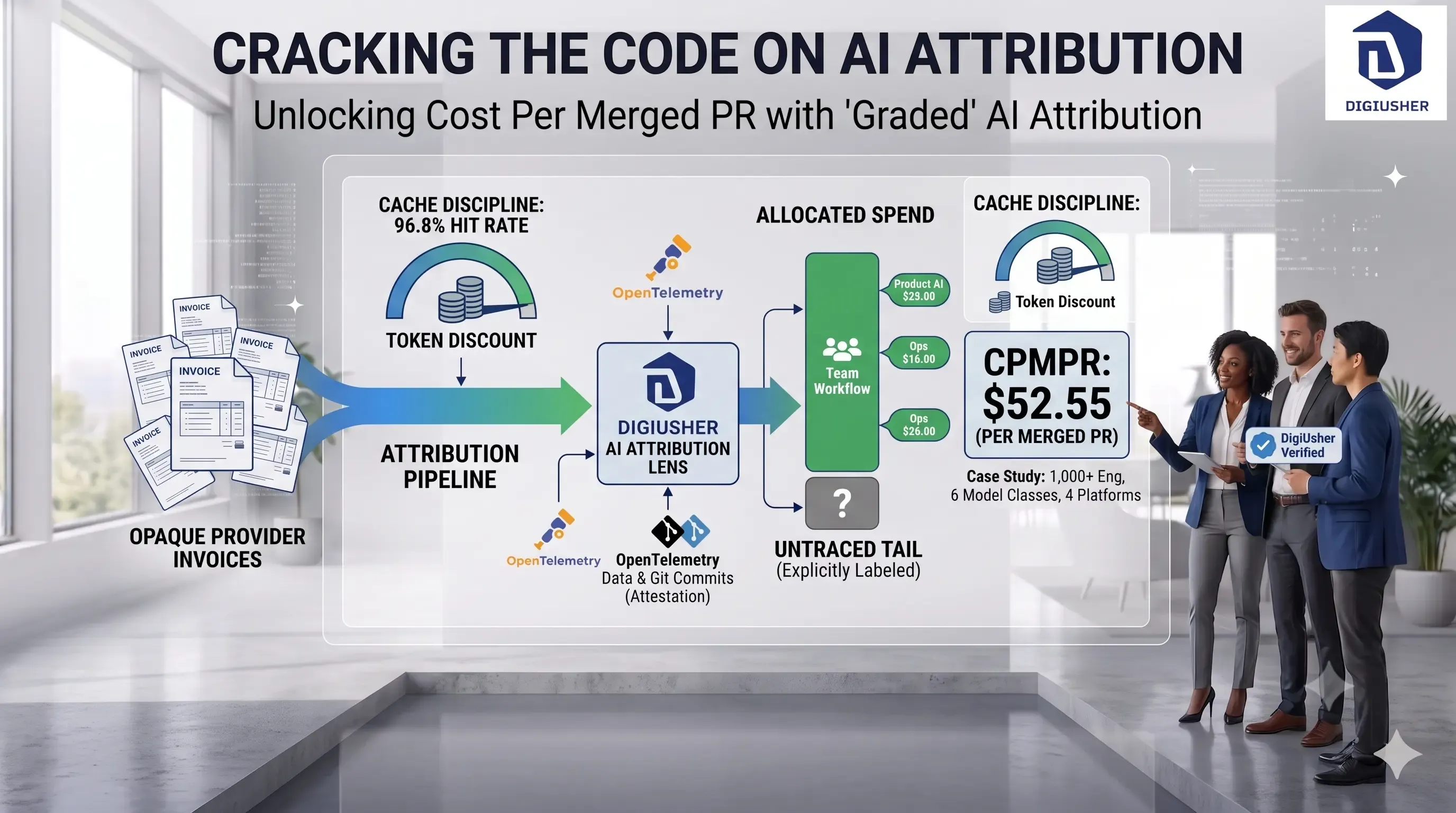
$52.55 Per Merged Pull Request: How One 1,000-Engineer Firm Priced Its Own AI Spend
A public technology firm with 1,000+ engineers refused to run its AI spend on faith. Here's the ledger it built instead — $52.55 per merged PR, 96.8% cache-hit rate, and a blended cost of $0.75 per million tokens.

AI Unit Economics: Why Your AI Invoice Can No Longer Answer the Board’s Question
98% of FinOps teams now manage AI spend, but almost none can price a merged pull request. Here's the framework for AI unit economics in 2026 — and why the invoice alone can't answer the board's question.